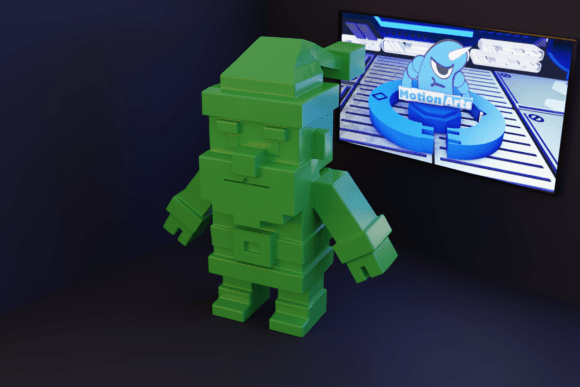
Checkered Santa Claus: A Modern 3D Printing Guide for Holiday Decor
The holiday season is synonymous with tradition, but that does not mean your decor must remain stuck in the past. Enter the Checkered Santa Claus, a striking reinterpretation of the classic Christmas icon. This model replaces the traditional soft curves and solid reds with a bold, geometric checkerboard pattern, offering a contemporary twist that appeals to modern aesthetics. For 3D printing enthusiasts, collectors, and interior designers, this STL file represents more than just a figurine; it is a statement piece that bridges nostalgic charm with digital artistry.
However, jumping into printing complex geometric designs like this without proper preparation can lead to disappointing results. Many hobbyists underestimate the nuances of printing high-contrast, patterned models. Understanding the specific requirements of the Checkered Santa Claus ensures you avoid wasted filament, failed prints, and structural weaknesses. This guide walks you through the common pitfalls and provides actionable advice to help you achieve a pristine, gallery-quality finish.
Understanding the Design Complexity
At first glance, a checkerboard pattern might seem simple—just alternating squares of color or texture. In 3D modeling, however, this design introduces unique challenges. The Checkered Santa Claus relies on precise geometry to maintain its visual impact. If the layers shift or the infill is inconsistent, the "checkered" effect can look muddy or distorted. This is particularly true if you are attempting a multi-color print or using filament changes to mimic the pattern.
One common misunderstanding is assuming that any standard Santa model can be easily modified into a checkered version. The AI-generated design of this specific model accounts for structural integrity while maintaining the aesthetic. Attempting to manually apply a checkerboard texture to a low-poly model often results in artifacts that are difficult to sand out. By choosing a dedicated STL file designed for this purpose, you save hours of post-processing work.
Common Mistakes in Printer Selection and Setup
Selecting the right hardware is the first critical decision. While the Checkered Santa Claus is compatible with both FDM (Fused Deposition Modeling) and resin printers, the approach differs significantly for each. A frequent error among beginners is using an FDM printer with a nozzle that is too large for the intricate details of the checkerboard grid. A 0.4mm nozzle is standard, but for sharper definition in the pattern, a 0.2mm or 0.25mm nozzle can make a substantial difference in clarity.
For resin users, the mistake often lies in orientation. Printing the model flat might seem intuitive to maximize adhesion, but it can cause pooling of resin in the deep recesses of the checkerboard squares, leading to incomplete cures. Instead, orienting the model at a slight angle helps ensure that each layer cures evenly and supports are easier to remove without damaging the delicate edges of the pattern.
The Support Structure Trap
Perhaps the most overlooked aspect of printing this model is support generation. The prompt explicitly states that support is required. Ignoring this or using generic auto-support settings can ruin the surface finish. Supports placed directly on the checkerboard faces will leave scars that are nearly impossible to hide, especially if you are painting the model in contrasting colors.
To avoid this, use manual support placement tools in your slicer software. Place supports on the underside of the hat, the back of the coat, and the base of the boots—areas that are less visible or easier to sand. For resin prints, use light touch supports to minimize contact points. For FDM prints, consider using tree supports, which often provide better stability for overhangs while touching the model at fewer points, preserving the integrity of the checkered design.
Material Choices and Their Impact on Aesthetics
The material you choose dictates the final look of your Checkered Santa Claus. Many users default to standard PLA, which is easy to print but can look plasticky. For a more premium feel, consider PETG or ASA, which offer better durability and a smoother surface finish. However, these materials require higher temperatures and enclosed printing environments to prevent warping.
If you are aiming for a true two-tone checkerboard effect, some makers attempt to pause the print and change filaments. This is an intermediate-level technique that requires precision. A common mistake here is not purging enough filament during the swap, resulting in color bleeding that blurs the sharp lines of the checkerboard. To mitigate this, purge extensively and consider designing the model with distinct color zones if your slicer allows for automatic filament changes based on height.
Alternatively, many successful prints use a single color of high-quality matte PLA. The checkerboard effect is then achieved through the interplay of light and shadow on the geometric surfaces, or by post-painting. This approach is often more forgiving and yields a cleaner, more sophisticated look than a imperfect multi-color print.
Post-Processing: Elevating the Final Product
Printing is only half the battle. The Checkered Santa Claus demands careful post-processing to shine. Rushing this stage is a costly mistake. If you are using FDM, layer lines can disrupt the visual flow of the checkerboard pattern. Sanding is essential, but it must be done methodically. Start with coarse grit to remove major imperfections and progress to fine grit for a smooth finish. Be careful not to round off the sharp edges of the squares, as this diminishes the geometric appeal.
Painting requires a steady hand. If you are painting the squares in alternating colors, use masking tape or vinyl stencils to ensure crisp lines. Freehand painting rarely achieves the precision needed for a professional look. Prime the model first to create a uniform base, which helps the paint adhere better and reduces the number of coats needed. A clear matte sealant at the end protects the paint and gives the model a cohesive, high-end appearance.
Verifying File Integrity Before Printing
Before you hit "slice," always inspect the STL file. Since this is an AI-generated design, it is prudent to check for non-manifold edges or inverted normals, which can cause slicing errors. Use a mesh repair tool if necessary. Additionally, verify the scale. A model that looks impressive on screen might be too small to show off the checkerboard detail when printed. Scale the model to at least 150mm in height to allow the pattern to breathe and be appreciated.
Remember that actual printed results may vary depending on your specific printer, materials, and slicer settings. Test prints with smaller sections of the model can help you dial in your settings before committing to a full-sized print. This saves time and material in the long run.
Final Thoughts on Modern Holiday Decor
The Checkered Santa Claus is more than a novelty; it is a testament to how technology can refresh tradition. By avoiding common pitfalls in printer setup, support generation, and post-processing, you can create a centerpiece that sparks conversation and admiration. Whether you are a seasoned maker or a curious beginner, taking the time to understand the nuances of this model ensures a satisfying creative process and a beautiful result. Embrace the modern twist, respect the technical requirements, and enjoy bringing a stylish new classic into your home this holiday season.