Creating Magic at Home: A Guide to the 3D Santa with Child Light Box SVG
The holiday season is a time defined by warmth, nostalgia, and the gentle glow of lights against the winter dark. For many, decorating the home is not merely a chore but a cherished ritual that sets the tone for the festivities. In recent years, the intersection of traditional craftsmanship and modern technology has given rise to a new form of seasonal decor: the 3D layered laser-cut lantern. Among the most captivating designs in this category is the 3D Santa with Child Light Box SVG. This intricate digital file allows hobbyists and professional makers alike to create a stunning, triangular lantern that radiates festive charm.
But what exactly makes this specific design so special? Why are layered light boxes becoming a staple in modern Christmas décor? This article explores the artistry, technology, and practical application of creating your own 3D Santa lantern, guiding you from concept to completion.
The Allure of Layered Paper and Wood Art
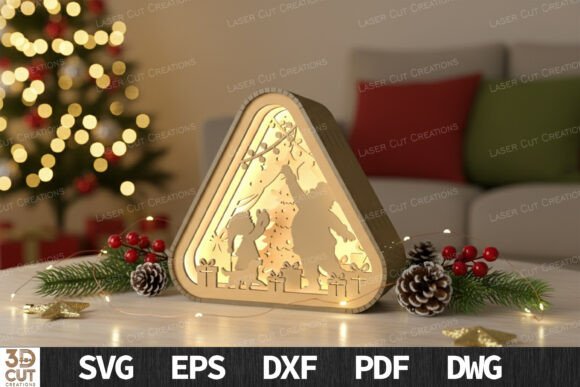
At its core, a 3D light box is a testament to the power of depth and shadow. Unlike flat decorations, these lanterns utilize multiple layers of material—typically wood or acrylic—stacked with spacers to create a sense of three-dimensional space. When illuminated from within, the layers cast soft shadows on one another, bringing the scene to life. The 3D Santa with Child design captures a tender moment, often depicting Saint Nicholas sharing a quiet, magical instant with a child. This narrative element adds an emotional resonance that goes beyond simple aesthetics.
The triangular shape of this particular lantern is also significant. It mimics the silhouette of a Christmas tree or a classic roofline, making it visually stable and pleasing to the eye. This geometric simplicity ensures that the focus remains on the detailed cutouts within the layers, such as snowflakes, stars, and the central figures of Santa and the child. The result is a piece of decor that feels both timeless and contemporary.
Why Choose a Laser-Cut Design?
In the past, creating such intricate layered art required hours of manual cutting with craft knives, a process prone to error and inconsistency. Today, laser cutting technology has democratized this art form. By using a digital SVG (Scalable Vector Graphics) file, you can achieve precision cuts that are impossible to replicate by hand. This precision is crucial for the "3D effect" to work correctly; if the layers do not align perfectly, the illusion of depth is broken.
Furthermore, laser cutting allows for reproducibility. Whether you are making a single centerpiece for your mantel or producing a batch of handmade gifts for friends and family, the quality remains consistent. This reliability makes the 3D Layered Christmas Lantern SVG an excellent choice for small business owners looking to expand their holiday product lines, as well as for DIY enthusiasts who value high-quality results.
Compatibility and Ease of Use
One of the primary concerns for beginners is whether their equipment can handle the project. The good news is that this design is crafted for broad compatibility. It works seamlessly with popular desktop laser cutters such as the Glowforge, xTool, and any machine compatible with LightBurn software. The file package typically includes multiple formats—SVG, DXF, EPS, PDF, and DWG—ensuring that regardless of your preferred design software, you can import and prepare the file with ease.
The design is optimized for standard material thicknesses, specifically 3mm plywood or acrylic sheets. This standardization means you do not need to source exotic or expensive materials. Common craft store plywood works beautifully, provided it is free of large knots that might interfere with the laser beam.
Step-by-Step: Bringing Your Lantern to Life
Creating your 3D Santa lantern is a rewarding process that combines technical skill with creative assembly. Here is a general overview of how to approach the project:
- Preparation: Download the SVG file and open it in your laser cutting software. Ensure your settings are calibrated for 3mm material. It is often wise to perform a test cut on a scrap piece of wood to verify power and speed settings.
- Cutting: Load your 3mm plywood or acrylic sheet into the laser cutter. The file will contain vectors for the outer frame, the internal decorative layers, and the base. Cut all pieces carefully. If using wood, you may want to lightly sand the edges after cutting to remove any char marks.
- Assembly: This is where the magic happens. The design features a layered structure that is ready to glue. Start with the back panel and work your way forward, adding spacers between each layer to maintain the depth. Use a strong wood glue or clear adhesive for acrylic.
- Lighting: Once the structure is assembled, insert small LED lights. Battery-operated fairy lights or dedicated LED modules work best. The light should be positioned to shine upward or outward through the layers, enhancing the 3D effect.
The assembly process is straightforward, but patience is key. Aligning the layers correctly ensures that the image of Santa and the child appears crisp and centered. The final product is a self-contained light box that requires no external wiring, making it safe and easy to place anywhere in your home.
Practical Applications and Decor Ideas
The versatility of the 3D Santa with Child Light Box extends beyond its immediate visual appeal. Because it is compact and self-powered, it can be integrated into various areas of your home decor:
- Tabletop Centerpieces: Place the lantern on your dining table during holiday meals. The warm glow creates an intimate atmosphere that encourages conversation and connection.
- Mantel Displays: Group the lantern with other natural elements like pine cones, evergreen branches, and candles for a rustic, cozy look.
- Handmade Gifts: Few gifts are as personal as something you have made yourself. Packaging a finished lantern in a clear box with a handwritten note makes for a memorable present that recipients will keep for years.
- Window Sills: Placing the lantern on a window sill allows the light to spill out into the night, sharing the festive spirit with passersby.
Common Misunderstandings About Laser Cutting
Many beginners assume that laser cutting is an overly complex or dangerous hobby. While safety precautions are necessary, modern desktop lasers are designed with user-friendly interfaces and safety features like enclosed chambers and air filtration. Another common misconception is that you need to be a graphic designer to use these files. In reality, pre-made SVGs like the 3D Layered Christmas Lantern are "ready to cut," meaning the hard work of design has already been done. Your role is that of a maker and assembler, not necessarily a designer.
The Significance of Handmade Holiday Traditions
In an era of mass-produced plastic decorations, there is a growing movement toward meaningful, handmade items. Creating a 3D Santa lantern connects you to a long tradition of crafting holiday decor. It transforms the act of decoration from a consumer transaction into a creative experience. The time spent cutting, assembling, and lighting the lantern imbues the object with personal significance. When you look at the glowing figure of Santa and the child, you are not just seeing a decoration; you are seeing the result of your own effort and care.
Moreover, this project highlights the positive potential of technology in creative pursuits. Rather than replacing human creativity, tools like the Glowforge and xTool empower individuals to bring complex ideas to life. They lower the barrier to entry for woodworking and intricate design, allowing more people to participate in the joy of making.
Conclusion
The 3D Santa with Child Light Box SVG offers a perfect blend of tradition and innovation. It allows you to create a piece of decor that is visually stunning, emotionally resonant, and technically impressive. Whether you are a seasoned laser cutting enthusiast or a beginner looking for a manageable first project, this design provides a satisfying and rewarding experience. By adding this warm and magical touch to your home, you are not just decorating a space; you are creating a focal point for holiday memories. So, fire up your laser cutter, gather your 3mm plywood, and let the festive glow begin.