Mastering the Mechanical Dragon Head 3D Model for Print and Display
The allure of fantasy meets the precision of engineering in the Mechanical Dragon Head 3D Model. This digital asset is not merely a static object; it is a narrative piece designed to capture the imagination. For creators, collectors, and hobbyists, bringing this creature to life offers a unique blend of artistic satisfaction and technical challenge. However, the gap between downloading a file and holding a flawless physical print is often wider than anticipated. Many enthusiasts rush into the printing process without fully understanding the nuances of the model’s geometry, leading to wasted filament, failed prints, and unnecessary frustration.
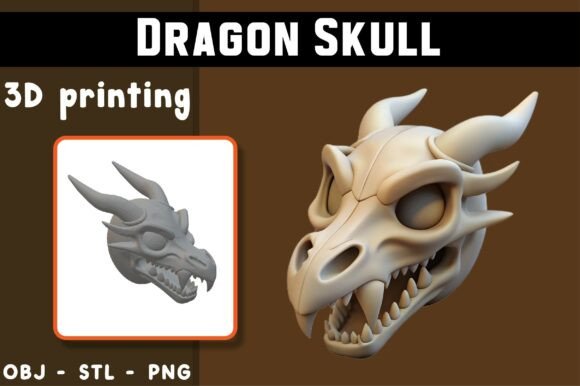
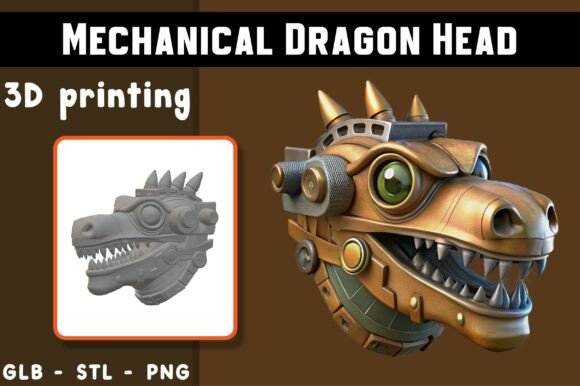
Understanding what makes this specific model special is the first step toward success. The design captures the excitement of a new creature emerging into the world, filled with expressive details and gentle, story-rich charm. It is crafted to be beginner-friendly while still delivering the intricate aesthetics that seasoned makers appreciate. Yet, even "beginner-friendly" labels can be misleading if you do not prepare your workflow correctly. This guide explores common pitfalls associated with using this mechanical dragon asset and provides practical advice to ensure your final result matches the high-quality rendered reference images provided.
Overlooking File Format Specifics
One of the most frequent mistakes users make is treating all downloadable files as interchangeable. When you acquire the Mechanical Dragon Head 3D Model, you typically receive multiple formats: STL, OBJ, and PNG. Each serves a distinct purpose, and using the wrong one for the wrong task can compromise your project.
The STL file is your primary resource for 3D printing. It contains the mesh data required for slicing software to generate toolpaths. Some users mistakenly attempt to import the OBJ file into their slicer without checking for compatibility issues or unnecessary metadata that might bloat the file size. While OBJ is ideal for previews, augmented reality (AR) applications, or digital showcasing in rendering engines, it is not always optimized for the direct slicing workflow. Always prioritize the STL for physical production.
Furthermore, the included PNG is a high-quality rendered reference image. A common error is assuming this image represents the exact layer-by-layer outcome you will achieve. The PNG is a visualization tool, often enhanced with lighting and textures that your printer cannot replicate physically. Relying on it as a strict quality benchmark can lead to disappointment. Instead, use it as a guide for orientation and aesthetic intent, not as a promise of photographic realism in plastic or resin.
Misjudging Slicer Settings and Geometry
Even with clean geometry designed for easy slicing, poor slicer configuration remains the leading cause of print failure. The mechanical dragon head features intricate details that require careful attention to support structures and layer height. A significant oversight is ignoring the need for supports. While the model is designed to deliver smooth, reliable print results, complex overhangs inherent in dragon anatomy—such as horns, jaws, and decorative plating—often necessitate strategic support placement.
Many beginners skip the preview stage in their slicer software. This is a critical error. You must preview the STL file in your slicer to visualize how the layers will build up. Look for bridging gaps or thin walls that may not adhere properly. Adjusting your infill density and wall line count can significantly impact the structural integrity of the head. For a display piece, a higher wall count often provides a better surface finish than high infill, reducing print time while maintaining durability.
Another overlooked detail is orientation. Printing the dragon head flat versus upright changes the stress points on the model. An upright print may show fewer layer lines on the face but requires more robust supports for the neck and chin. A flat print might reduce support needs but could result in visible seam lines across the snout. Test both orientations with small sections if possible, or consult community forums for recommended settings specific to this model’s geometry.
Ignoring Material and Printer Variability
The disclaimer accompanying the Mechanical Dragon Head 3D Model rightly notes that print results may vary depending on your printer, materials, and settings. Yet, many users blame the model for failures that are actually due to material mismatch. For instance, using a brittle PLA without proper cooling can lead to snapping during support removal, especially on delicate mechanical parts. Conversely, using PETG without adjusting retraction settings can cause stringing between the intricate gears and plates of the dragon’s design.
It is essential to understand your printer’s limitations. If you are using a fused deposition modeling (FDM) printer, the nozzle size dictates the minimum feature size you can accurately reproduce. A 0.4mm nozzle may struggle with very fine mechanical details compared to a 0.2mm nozzle. If your prints look blobby or lack definition, the issue is likely not the model’s design but your hardware’s resolution capabilities. Upgrading to a smaller nozzle or slowing down the print speed can mitigate these issues without requiring a new model.
Expecting Immediate Perfection
Patience is a virtue in 3D printing, yet it is often in short supply. Users frequently discard a print after the first attempt fails, assuming the file is defective. In reality, 3D printing is an iterative process. The first print is rarely the best. It serves as a test bed for your settings. If supports leave marks on the surface, adjust the support interface distance. If layers shift, check your belt tension and stepper motor currents.
Post-processing is another area where expectations often diverge from reality. The raw print will rarely look like the polished PNG reference. Sanding, priming, and painting are standard steps for achieving a professional finish. Neglecting these steps can leave your mechanical dragon looking rough and unfinished. Embrace the post-processing phase as part of the creative journey. Use fine-grit sandpaper to smooth layer lines and apply a primer to unify the surface before painting. This transforms a good print into a great display piece.
Best Practices for a Successful Print
To ensure you get the most out of your Mechanical Dragon Head 3D Model, follow these constructive steps:
- Verify Your Files: Download all formats but use the STL for slicing. Keep the OBJ for digital portfolios or AR presentations.
- Preview in Slicer: Never send a file to print without inspecting the layer view. Check for unsupported overhangs and adjust support generation accordingly.
- Choose the Right Material: Start with high-quality PLA for ease of use. If you need durability, consider PETG but tune your retraction settings to minimize stringing.
- Optimize Orientation: Experiment with positioning the model to balance surface quality against support usage. Orient the face to minimize visible layer lines.
- Plan for Post-Processing: Allocate time for removing supports, sanding, and painting. These steps are crucial for achieving the "magical moment" described in the model’s presentation.
By approaching the Mechanical Dragon Head 3D Model with a mindset of preparation and iteration, you avoid the common traps that plague many 3D printing projects. This model is designed to be accessible, but accessibility does not mean immunity from the fundamentals of additive manufacturing. Respect the process, understand your tools, and you will create a piece that truly adds wonder and magic to your collection. Whether for decorative display, educational purposes, or personal enjoyment, the effort invested in proper preparation yields a result that is both visually striking and technically sound.
Remember, this is a digital product. No physical item will be shipped. The value lies in your ability to translate the digital design into a tangible object. With the right knowledge and attention to detail, your mechanical dragon will emerge from the printer not just as a plastic object, but as a crafted work of art.