Integrating the Christmas Gift 3D Model into Your Holiday Production Workflow
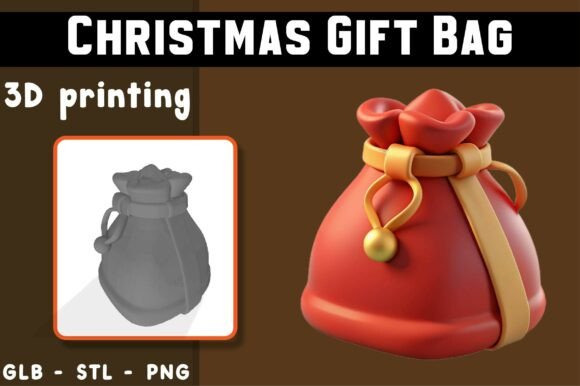
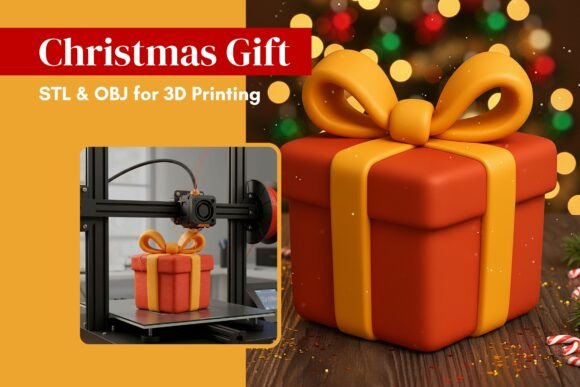
The holiday season places unique demands on creators, small business owners, and hobbyists alike. Whether you are preparing for a seasonal market, designing festive dioramas, or simply looking to add a personal touch to your home decor, the efficiency of your production pipeline matters. This is where digital assets like the Christmas Gift 3D model become essential components of a streamlined creative process. This adorable kawaii-style 3D gift box, characterized by its rounded, smooth shapes and minimalist aesthetic, is not merely a static object; it is a versatile tool that fits seamlessly into various stages of design, printing, and final presentation.
Understanding how to effectively integrate this digital file into your existing workflow can significantly reduce preparation time while enhancing the quality of your output. By treating the STL and OBJ files as foundational assets, you can focus less on modeling from scratch and more on customization, scaling, and finishing techniques that align with your specific project goals.
Pre-Production: Asset Selection and Compatibility Checks
Before initiating any print job, the first phase of your workflow involves asset verification and software compatibility. The Christmas Gift 3D model is provided in two standard formats: .STL and .OBJ. For most users, the .STL file will be the primary choice due to its widespread support across slicing software such as Cura, PrusaSlicer, and Bambu Studio. However, keeping the .OBJ file available is prudent if you plan to perform minor mesh edits in CAD software like Blender or Fusion 360 before slicing.
During this preparatory stage, it is crucial to assess the model’s geometry against your printer’s capabilities. The design features large decorative ribbons and bows in relief, along with soft, rounded corners. These elements require careful consideration regarding overhangs and support structures. While the kawaii style implies simplicity, the protruding bow may necessitate tree supports or organic supports depending on your printer’s resolution and filament type. Evaluating these factors early prevents failed prints and material waste later in the process.
Additionally, consider the intended scale of your project. Since the model is scalable, you must decide on the final dimensions during this phase. Will this be a small ornament for a tree, a centerpiece for a table setting, or part of a larger diorama? Defining the scale upfront allows you to adjust infill density and wall thickness appropriately in your slicer, ensuring structural integrity regardless of size.
Workflow Integration: From Slicer to Printer
Once the asset is selected and the scale is determined, the next step is configuring the slicing parameters. This phase is where theoretical planning meets practical execution. The Christmas Gift 3D model’s minimalist design offers flexibility, but achieving a high-quality finish requires precise settings. For users aiming for a smooth, professional look, orienting the model to minimize visible layer lines on the front-facing surfaces is recommended. Placing the flat base of the gift box on the build plate ensures stability, while the ribbon and bow may require strategic support placement to maintain their shape without leaving excessive marks.
Material selection also plays a pivotal role in the workflow. PLA is often the go-to choice for decorative items due to its ease of use and vibrant color options. However, if the item is intended for long-term display or exposure to varying temperatures, PETG might offer better durability. The choice of material influences not only the print settings but also the post-processing requirements. For instance, PLA allows for easier sanding and painting, which is beneficial if you plan to customize the gift box with metallic accents or festive patterns.
Efficiency in this stage can be improved by batching prints. If you are producing multiple units for commercial sale or gifts, arranging several instances of the model on the build plate can maximize throughput. Ensure adequate spacing between models to prevent heat creep issues and allow for easy removal. This approach transforms a single digital file into a scalable production run, aligning with the needs of entrepreneurs and small business owners managing inventory for the holiday rush.
Post-Processing and Quality Control
After printing, the workflow shifts to post-processing, a critical step for achieving the polished look associated with kawaii aesthetics. The Christmas Gift 3D model’s smooth, rounded shapes are designed to be visually appealing, but raw prints may exhibit layer lines or support scars. Begin by carefully removing supports, using flush cutters for precision to avoid damaging the delicate ribbon details. Light sanding with fine-grit sandpaper can further smooth out any imperfections, particularly around the bow and edges.
For those incorporating this model into dioramas or collectible figures, painting adds a layer of customization that enhances its value. The minimalist design serves as an excellent canvas for creative expression. You might choose to paint the box in traditional red and green hues or opt for modern pastels to match a specific interior design theme. Applying a primer before painting ensures better adhesion and color vibrancy. A clear coat sealant can protect the finish, making the item more durable for handling or display.
Quality control is essential, especially if you are producing these items for commercial use. Inspect each print for consistency in shape, surface finish, and structural integrity. Discard any prints with significant warping or layer shifts. Maintaining high standards ensures customer satisfaction and reinforces your reputation as a reliable creator. Documenting your settings and post-processing steps can also help replicate successful results in future batches, creating a standardized workflow that saves time and reduces variability.
Practical Use Cases and Strategic Applications
The versatility of the Christmas Gift 3D model extends beyond simple decoration. Understanding its potential applications can help you leverage it more effectively in various contexts. For educators, this model can serve as a teaching tool for introducing students to 3D printing concepts, such as scaling, orientation, and support generation. Its simple geometry makes it accessible for beginners, while the decorative elements provide opportunities to discuss aesthetic considerations in design.
For marketers and content creators, the model can be used to produce props for holiday-themed photoshoots or video backgrounds. The kawaii style appeals to a broad audience, making it suitable for social media content that aims to evoke warmth and festivity. By printing multiple sizes and colors, you can create dynamic compositions that enhance visual storytelling. This approach integrates digital fabrication into content creation workflows, adding a tangible element to digital campaigns.
Small business owners can incorporate the printed gift boxes into their product packaging or as standalone merchandise. Offering customized, 3D-printed decorations can differentiate your brand during the competitive holiday season. You might bundle the gift box with other handmade items or sell it as part of a festive collection. The ability to scale the model allows you to cater to different price points and customer preferences, enhancing your product line’s flexibility.
Long-Term Value and Digital Asset Management
Investing time in mastering the use of the Christmas Gift 3D model yields long-term benefits. By refining your workflow around this asset, you develop skills that are transferable to other projects. Understanding how to optimize slicer settings for complex geometries, manage support structures efficiently, and execute high-quality post-processing techniques enhances your overall competency in 3D printing.
Furthermore, maintaining an organized library of digital assets, including this gift box model, streamlines future projects. Tagging files with relevant metadata, such as print settings, material recommendations, and use cases, allows for quick retrieval and replication. This practice supports consistency and efficiency, enabling you to respond rapidly to new opportunities or deadlines. As you accumulate experience, you may even modify the original design to create variations, expanding your creative portfolio.
In conclusion, the Christmas Gift 3D model is more than a festive decoration; it is a practical tool that integrates smoothly into diverse workflows. By approaching its use with a focus on preparation, precision, and creativity, you can maximize its potential and achieve high-quality results. Whether you are a hobbyist, educator, or entrepreneur, leveraging this digital asset effectively can enhance your holiday projects and contribute to a more efficient and productive creative process.